
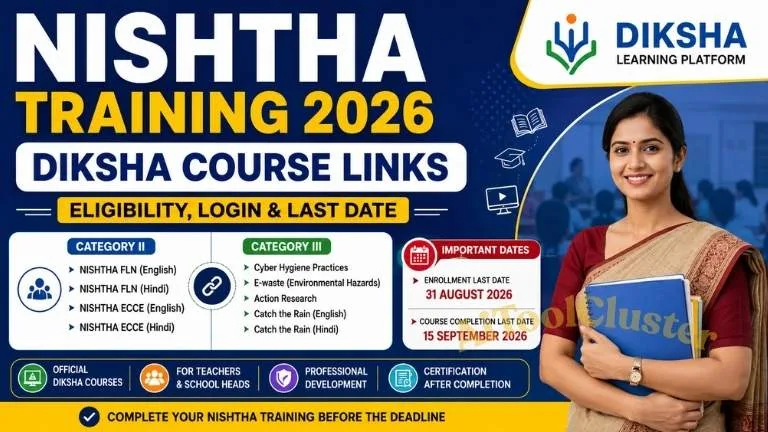
NISHTHA Training 2026: DIKSHA Course, Login, Eligibility, Certificate & How to Complete
NISHTHA Training 2026 is an important online professional development programme available through the DIKSHA learning ecosystem. Teachers, school heads and other eligible education personnel can access applicable courses, complete learning modules and, where a course provides certification, receive a digital certificate after meeting the prescribed completion criteria.
This complete guide explains NISHTHA Training 2026, DIKSHA login, course registration, eligibility, course completion, assessment, certificate download and important instructions in simple language.
NISHTHA Training 2026 – Quick Information
| Particular | Details |
|---|---|
| Programme | NISHTHA – National Initiative for School Heads' and Teachers' Holistic Advancement |
| Learning Platform | DIKSHA |
| Mode | Online / Digital Learning |
| Target Users | Eligible teachers, school heads and specified education personnel |
| Course Access | DIKSHA Portal / DIKSHA Mobile App |
| Login | DIKSHA registered account |
| Assessment | As applicable to the individual course |
| Certificate | Available for courses with applicable certification criteria |
| Official Platform | DIKSHA |
What Is NISHTHA Training?
NISHTHA stands for National Initiative for School Heads' and Teachers' Holistic Advancement. It is designed to support professional development and capacity building among teachers, school leaders and other eligible education personnel.
Through DIKSHA, eligible learners can access structured digital courses containing learning resources, modules and activities. Depending on the course, learners may also need to complete assessments or other requirements before the course is considered complete.
Who Can Use NISHTHA Training?
The exact target group depends on the NISHTHA course and the applicable batch. Different courses may be designed for different educational stages, roles or areas of professional development.
- School teachers
- School heads
- Teachers working at different educational stages
- Selected education officials
- Other personnel specifically included in a particular course
Participants should check the target group and batch information shown on the specific DIKSHA course page before enrolling.
DIKSHA Apps & Official Links
The following table provides useful official DIKSHA links for accessing the learning platform, mobile application, courses and help resources.
| DIKSHA Service | Use | Official Link |
|---|---|---|
| DIKSHA Official Portal | Courses, training and learning resources | Open DIKSHA |
| DIKSHA Android App | Access DIKSHA courses and learning content on Android | Download Android App |
| DIKSHA iPhone / iPad | Access DIKSHA on supported Apple devices | Open App Store |
| NISHTHA Training | Find applicable NISHTHA courses and batches | Find Course on DIKSHA |
| DIKSHA Help Centre | Courses, login, certificate and technical help | Open Help Centre |
ખાસ સૂચના: DIKSHA કોર્સ પૂર્ણ કરવા બાબતે
DIKSHA કોર્સ કરતી વખતે જો કોઈ Video અથવા PDF internet connection વગર open થવામાં મુશ્કેલી આવે, તો નીચેની troubleshooting રીત અજમાવી શકાય છે.
- સૌપ્રથમ DIKSHA Course App ખોલવી.
- ત્યારબાદ હાલમાં જે Course ચાલુ હોય તે Course ખોલવો.
- Course pageના ઉપરના જમણા ખૂણામાં જો Downloadનું ચિહ્ન ઉપલબ્ધ હોય તો તેને touch કરીને ઉપલબ્ધ course content download કરવું.
- Download પૂર્ણ થયા બાદ internet connection બંધ કરીને જે Video અથવા PDF અગાઉ open થતી ન હોય તેને ફરીથી open કરવાનો પ્રયાસ કરવો.
- જો downloaded content offline access માટે ઉપલબ્ધ હોય તો તે content internet વગર પણ ચલાવી શકાય છે.
- Video શરૂ થયા બાદ internet connection ફરી ON કરીને courseનો progress / completion status check કરવો.
- આ રીતે courseના દરેક required module, activity અને assessment પૂર્ણ થયા છે કે નહીં તે તપાસવું.
એકવાર internet ON કરીને સંબંધિત module open કરો અને content load થવા દો. ત્યારબાદ જરૂર હોય તો internet OFF કરીને downloaded content ફરીથી open કરવાનો પ્રયાસ કરો.
નોંધ: દરેક DIKSHA courseમાં offline download અથવા completion behaviour એકસરખું હોવું જરૂરી નથી. જો progress અથવા completion mark update ન થાય, તો internet ON રાખીને course ફરી open કરીને DIKSHAમાં progress તપાસો અને courseની official instructions follow કરો.
How to Login to DIKSHA for NISHTHA Training
- Open the official DIKSHA portal or app.
- Select the Login option.
- Enter your registered DIKSHA account details.
- Open the Courses or learning section.
- Search for the required NISHTHA course.
- Open the correct course and check the applicable batch.
How to Join NISHTHA Course on DIKSHA
- Login to your DIKSHA account.
- Open the relevant NISHTHA course.
- Read the course description.
- Check the target group and language.
- Check the available batch.
- Check the enrolment dates.
- Select Join Course if the applicable batch is open.
- Continue according to the instructions shown on DIKSHA.
How to Complete NISHTHA Training 2026
Step 1 – Open My Courses
After login, open your enrolled courses and select the relevant NISHTHA course.
Step 2 – Start Learning
Open the course and start the available learning modules.
Step 3 – Complete All Required Modules
Read or watch the required learning material and complete the activities included in the course.
Step 4 – Complete Assessment
If an assessment is included, complete it according to the requirements shown in the course.
Step 5 – Check Course Progress
Return to the course page and verify that the required learning activities have been completed.
Step 6 – Certificate
If the course provides certification and you satisfy its required criteria, the certificate can become available through your DIKSHA profile.
NISHTHA Training Certificate 2026
Not every DIKSHA course necessarily provides a certificate. Certificate availability and issuance requirements depend on the individual course.
For courses that provide certification, eligible participants can generally view and download the certificate through their DIKSHA profile after meeting the prescribed completion requirements.
How to Download NISHTHA Certificate
- Login to your DIKSHA account.
- Open your Profile.
- Go to the courses attended section.
- Find the completed certified course.
- Select the certificate option when available.
- Download or save the certificate.
What If NISHTHA Course Is Not Showing?
If a NISHTHA course is not visible in your account, first make sure that you are logged into the correct DIKSHA account and that the relevant course or batch is currently available.
- Check the course name.
- Check the target group.
- Check the applicable state or organization.
- Check the course language.
- Check the batch enrolment dates.
- Check whether the batch has expired.
NISHTHA Progress Not Updating
If your course progress is not updating, make sure that you are using the same account with which you enrolled in the course. Reopen the course and check whether all required activities have been completed.
If the problem continues, connect to the internet and reopen the affected module so that the latest course status can be synchronized.
NISHTHA Certificate Not Showing
If the certificate is not showing, first check whether the particular course provides certification and whether all required modules and assessments have been completed.
Also verify your course progress and profile information before contacting the relevant support channel.
Important Points for NISHTHA Training
- Use your own DIKSHA account.
- Check your profile information before joining a course.
- Choose the correct NISHTHA course and batch.
- Check the target group before enrolment.
- Complete all required learning modules.
- Complete assessments where applicable.
- Check your course progress.
- Download the certificate after successful completion where certification is available.
- Never share your DIKSHA login credentials with others.
Official DIKSHA Link for NISHTHA Training
NISHTHA training is delivered through the DIKSHA learning ecosystem. Use the official DIKSHA platform to search for the applicable NISHTHA course and check the latest batch information.
Frequently Asked Questions
What is NISHTHA Training 2026?
NISHTHA is a professional development initiative for eligible teachers, school heads and other education personnel. Applicable training courses can be delivered through the DIKSHA platform.
Where can I complete NISHTHA Training?
Applicable NISHTHA courses can be accessed through the official DIKSHA portal or DIKSHA mobile application.
Do I need a DIKSHA account?
A registered DIKSHA account is generally required to enrol in an available course and track learning progress.
Can I complete a DIKSHA course from mobile?
Yes. DIKSHA provides access to courses through its mobile application, subject to the applicable course and device requirements.
Does every NISHTHA course provide a certificate?
No. Certification depends on the individual course and its configured certificate criteria.
How can I download my NISHTHA certificate?
After completing a certified course and satisfying its requirements, login to DIKSHA, open your profile and check the relevant completed course for the certificate option.
What should I do if my NISHTHA course is not visible?
Check that you are using the correct DIKSHA account and verify the course, target group, language and batch availability. If the batch has expired, follow the latest instructions provided by the concerned authority.
Diksha Course Paripatra Download Here
Useful Aitoolcluster Education Resources
DIKSHA NIPUN Training:
DIKSHA NIPUN Training 2026 – Login, Profile Update & Course Link
NIPUN Gujarat Mission:
NIPUN Gujarat Mission 2026-27 – Complete Information
NIPUN Gujarat Roadmap:
NIPUN Gujarat Roadmap 2026-29 – FLN Materials & Important Information
Gujarat School Online Entry Links:
Gujarat School Online Entry Links 2026 – Useful Portals for Teachers & Schools
More Education Updates:
Visit Aitoolcluster for Education, Teacher Training, AI Tools, Government Updates and Career Information.
NISHTHA Training 2026 provides eligible education professionals with access to structured online learning through the DIKSHA platform. The exact course, target group, batch dates, assessment requirements and certification criteria can differ, so participants should always check the latest information displayed on the applicable DIKSHA course page.
For a smooth experience, use the correct DIKSHA account, verify your profile information, join the appropriate course, complete the required modules and assessments, and check your profile for the certificate after successful completion where certification is offered.
For the latest teacher-training, Gujarat education and digital learning updates, continue visiting Aitoolcluster.com.

COMMENTS (0)
Be the first to comment!
Leave a Comment