Janmashtami AI Photo Editing Prompts 2026: Krishna AI Photo Ideas
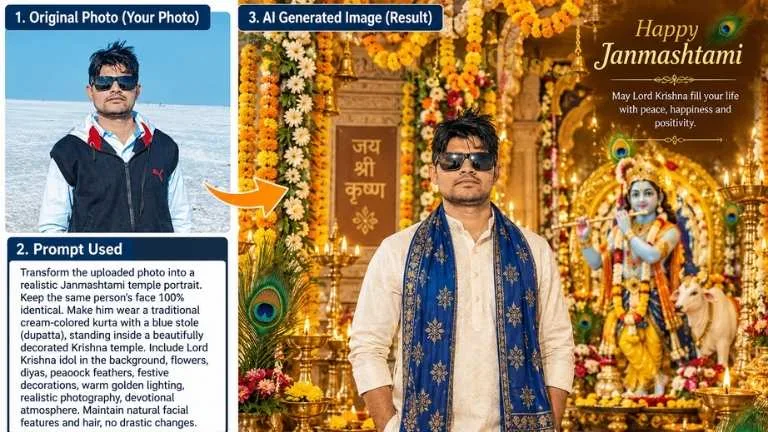
Janmashtami is a beautiful occasion to create festive and devotional AI photo edits. With a clear reference photo and a well-written prompt, you can create Krishna-inspired portraits, temple scenes, Dahi Handi celebrations, traditional outfits, artistic paintings and festive greeting images.
This collection brings together 18 original Janmashtami AI Photo Editing Prompts 2026 in one place. Each prompt is designed to give the AI clear instructions about the subject, clothing, background, lighting and overall visual style.
Quick Guide: 1. Choose a clear reference photo. 2. Copy your preferred prompt. 3. Upload the photo to your AI image editor. 4. Paste the prompt and generate the image. 5. If needed, make small changes to clothing, lighting or background.
Why Use Janmashtami AI Photo Editing Prompts?
A detailed prompt gives an AI image editor a clearer idea of the visual result you want. Instead of simply asking for a Krishna-themed photo, you can describe the outfit, decorations, environment, lighting, composition and artistic style.
These prompts are useful for festive profile pictures, family greetings, social media posts, digital invitations and personal Janmashtami memories.
18 Best Janmashtami AI Photo Editing Prompts 2026
1. Krishna Temple Portrait AI Prompt
Create a realistic Janmashtami portrait using my uploaded photo as the main identity reference. Preserve my recognizable facial identity, natural facial structure, skin tone and expression without unnecessary changes. Place me inside a beautifully decorated Krishna temple wearing an elegant cream kurta with a royal blue stole. Add marigold flowers, glowing diyas, decorative clay pots, peacock feather details and a beautifully arranged Krishna idol in the background. Use warm golden festival lighting, realistic skin texture, natural depth of field and a refined cinematic photography style.
2. Dahi Handi Celebration AI Prompt
Transform my uploaded photo into a festive Janmashtami portrait while preserving my recognizable face and natural appearance. Show me near a beautifully decorated Dahi Handi setup with flower garlands, colorful fabrics, traditional lamps and Krishna-inspired decorations. Give the scene a joyful celebration atmosphere with warm evening lights, realistic details, natural shadows and cinematic depth. Keep the composition elegant and suitable for a festive social media portrait.
3. Krishna-Inspired Traditional Portrait
Create a graceful Krishna-inspired portrait from my reference photo. Keep my recognizable facial features, natural skin texture and expression consistent with the uploaded image. Dress me in a traditional yellow silk dhoti-style outfit with subtle golden detailing, pearl accessories and a tasteful peacock-feather-inspired headpiece. Add a soft temple-inspired background, flowers and warm devotional lighting. Make the final image photorealistic, balanced and culturally respectful.
4. Vrindavan-Inspired AI Photo Prompt
Use my uploaded photograph as the identity reference and create a peaceful Vrindavan-inspired festive portrait. Preserve my recognizable facial appearance and natural expression. Place me in a lush garden setting with flowering plants, traditional architecture, soft greenery and subtle Krishna-themed decorative elements. Use golden-hour sunlight, gentle background blur and realistic photography details to create a peaceful Janmashtami atmosphere.
5. Peacock Feather and Flute Theme
Create a cinematic Krishna-inspired portrait from my uploaded photo. Maintain my recognizable facial identity and natural features. Add a traditional outfit in rich blue and gold tones, a tasteful peacock feather accessory and a polished wooden flute as a visual prop. Use soft floral surroundings, subtle festive decorations and warm natural light. The final result should look like a professional portrait photograph with realistic textures and natural proportions.
6. Janmashtami Night Celebration Prompt
Create a dramatic yet peaceful Janmashtami night portrait using my uploaded image as the identity reference. Preserve my recognizable face and natural appearance. Place me in a beautifully decorated festive courtyard illuminated by rows of diyas, hanging lights and flowers. Add subtle blue and golden tones, soft bokeh and a calm devotional atmosphere. Use realistic photography, natural skin texture, cinematic lighting and professional portrait composition.
7. Family Janmashtami AI Photo Prompt
Create a warm family Janmashtami portrait using the uploaded family photo as the reference. Preserve each person's recognizable facial identity and natural appearance. Dress the family in coordinated traditional Indian festive clothing and place them in a beautifully decorated home prayer area with flowers, diyas, rangoli and tasteful Krishna-themed decorations. Use soft warm lighting, realistic skin texture, natural expressions and a premium family-photography composition.
8. Premium Krishna-Themed Portrait
Turn my reference photograph into a premium Krishna-inspired festive portrait. Preserve my recognizable identity, facial structure and natural expression. Use an elegant blue-and-gold traditional outfit with refined jewelry and a subtle peacock feather detail. Create a luxurious temple-inspired environment with flowers, lamps and soft golden illumination. Use professional studio-quality composition, realistic materials, cinematic depth of field and natural-looking details.
9. Child Krishna-Inspired Gokul Portrait
Create an age-appropriate Krishna-inspired festive portrait of the child in the uploaded photo. Preserve the child's recognizable facial features, natural expression and age-appropriate appearance. Dress the child in a bright yellow traditional outfit with tasteful golden borders and a small decorative peacock-feather accessory. Place the child in a sunny Gokul-inspired courtyard with flowers and a small traditional butter pot nearby. Use soft natural lighting, realistic textures and a cheerful family-friendly photography style.
10. Playful Little Krishna-Inspired Butter Scene
Create a cute, age-appropriate Krishna-inspired scene using the child in the reference photo. Keep the child's recognizable face and natural expression consistent with the original image. Place the child in a traditional Indian village kitchen surrounded by clay pots and warm wooden details, with a small butter pot as a playful prop. Add a cheerful festive mood, gentle ambient lighting and detailed textures. Use a soft storybook-inspired visual style while keeping the child's appearance natural.
11. Cute 3D Little Krishna-Inspired Character
Create a family-friendly 3D animated Krishna-inspired portrait of the child in the uploaded photo. Preserve the child's recognizable face, eye shape and natural smile while adapting the overall image into a polished 3D animation aesthetic. Add a small decorative peacock feather accessory and a simple wooden flute prop. Use bright but balanced colors, clean lighting, rounded stylized forms and a cheerful whimsical background. Keep the character age-appropriate and friendly.
12. Watercolor Krishna-Inspired Child Portrait
Create an artistic watercolor portrait of the child from the uploaded reference image with a gentle Krishna-inspired festive theme. Preserve the child's recognizable facial resemblance and natural expression. Surround the portrait with soft pastel shades, delicate lotus flowers, subtle golden decorative elements and a peaceful background. Use visible watercolor textures, soft brushwork, dreamy lighting and a clean family-friendly composition.
13. Royal Infant Krishna-Inspired Swing Scene
Create a wholesome Krishna-inspired festive portrait of the child in the uploaded photo sitting comfortably on a beautifully decorated traditional wooden swing. Preserve the child's recognizable facial identity and natural age-appropriate appearance. Decorate the swing with marigold garlands and soft fabric, and dress the child in a royal blue and gold traditional outfit with tasteful pearl-style accessories. Add warm festival lighting, natural details and a cheerful Janmashtami atmosphere.
14. Little Krishna-Inspired Yamuna Riverbank Scene
Create an age-appropriate Krishna-inspired outdoor portrait using the child's uploaded photo as the reference. Preserve the child's recognizable face and natural expression. Place the child in a peaceful riverside garden inspired by the Yamuna region, with lush greenery, gentle cows in the distant background and soft sunset light. Add a simple flute as a decorative prop and subtle traditional clothing details. Use cinematic composition, natural colors and realistic photography.
15. Indian Miniature Painting Krishna Style
Convert the uploaded child's portrait into a respectful Indian miniature-painting-inspired artwork with a Krishna theme. Keep the child's recognizable facial resemblance while translating the image into traditional painted artwork. Use intricate brush details, decorative floral patterns, indigo and saffron tones, subtle gold-like accents and a lotus-inspired setting. Create a handcrafted painting texture with an elegant traditional composition and family-friendly appearance.
16. Dahi Handi Greeting Card for Kids
Create a cheerful Janmashtami greeting-card style image featuring the child from the uploaded photo in an age-appropriate Krishna-inspired traditional outfit. Preserve the child's recognizable facial identity and natural appearance. Place the child beside a beautifully decorated Dahi Handi arrangement with flowers, diyas, festive decorations and colorful confetti. Use warm celebratory lighting, high dynamic range, clean composition and enough empty space for a short festival greeting to be added later.
17. Peaceful Full-Moon Krishna-Inspired Portrait
Create a peaceful, age-appropriate Krishna-inspired night portrait using the child's uploaded photo as the identity reference. Preserve the child's recognizable facial appearance and natural expression. Place the child in a serene garden beneath a bright full moon with soft stars, gentle blue ambient light and a tasteful peacock-feather accessory. Add subtle traditional clothing details and a calm festive atmosphere. Use realistic photography, soft focus background and natural proportions.
18. Cute Baby Krishna-Inspired Butter Pot Scene
Create a wholesome Baby Krishna-inspired festive scene using the uploaded child's photo. Preserve the child's recognizable facial features and age-appropriate natural appearance. Show the child in a cheerful traditional setting beside a small decorated butter pot on a clean polished floor. Use soft studio-style lighting, warm yellow and gold tones, gentle festive decorations and realistic textures. Keep the expression natural, the composition uncluttered and the overall image suitable for a family-friendly Janmashtami greeting.
How to Use These Janmashtami AI Prompts
Step 1: Select a clear photo where the face is visible.
Step 2: Open your preferred AI image editor.
Step 3: Upload your reference photo.
Step 4: Copy one complete prompt from this article.
Step 5: Paste the prompt along with the uploaded image.
Step 6: Generate the image and refine individual details if necessary.
How to Get Better AI Photo Results
Use a clear, well-lit reference image.
Avoid heavily blurred or very dark photos.
Describe the desired background clearly.
Ask the AI to preserve recognizable facial features.
Change one element at a time when refining an image.
For text-based greeting cards, add the greeting separately when possible.
Check the generated image for unusual hands, accessories or background objects before sharing it.
Best Janmashtami AI Photo Styles
Style
Best For
Temple Portrait
Profile photos and devotional posts
Dahi Handi
Festive social media images
Krishna-Inspired Portrait
Traditional portraits
Watercolor Art
Creative artwork
Miniature Painting
Traditional artistic designs
Greeting Card
Janmashtami wishes
Frequently Asked Questions
What are Janmashtami AI Photo Editing Prompts?
They are detailed instructions that tell an AI image editor how to create or transform a photo with Janmashtami and Krishna-inspired visual elements.
Can these prompts be customized?
Yes. You can change clothing colors, background settings, lighting, composition and artistic style according to your preferred result.
Which photo works best?
A clear image with good lighting and a visible face generally gives the AI more useful reference information.
Can I use these prompts for family photos?
Yes. The family prompt is designed for group images. When several people appear in one photograph, a clear original image can help the AI maintain the different faces more consistently.
Why does AI sometimes change the face?
AI image editors may reinterpret facial details while generating a new composition. Adding clear identity-preservation instructions and using a good reference photo can help, although results can vary between tools.
Janmashtami AI photo editing is a creative way to give ordinary photographs a festive Krishna-inspired look. From traditional temple portraits and Dahi Handi scenes to watercolor artwork and family greeting cards, these 18 prompts provide different directions for experimenting with AI image editing.
For the best result, start with a good reference image, use one prompt at a time and make small adjustments instead of changing the entire instruction repeatedly.
Want more AI photo editing ideas? Explore our Google Gemini Android App guide for more information about using Gemini for AI-powered tasks.
Disclaimer:Information provided on this website is for educational and informational purposes only. Please verify all details from the official website before relying on them.





COMMENTS (0)
Be the first to comment!
Leave a Comment