
A read-aloud app narrates stories to your child. The app reads; your child listens. These are fantastic for bedtime, for building vocabulary, for exposing kids to books above their reading level. Epic!, Vooks, Storyline Online — these are primarily read-aloud tools.
A read-along app works the other way around. Your child reads the story out loud, and the app listens. It follows along, highlights words, gently corrects mistakes, and encourages them to keep going. Google Read Along is the clearest example of this. The child is doing the work; the app is the audience.
Download App : Click Here
Both serve a purpose. But if what you want is something that builds reading fluency — the ability to read accurately, with appropriate speed — your child needs to be the one reading. An app that reads to them won't build that skill. It's the difference between watching someone swim and getting in the water yourself.
Keep this in mind as you work through the rest of this article.
Languages, Stories, and What's in the Library
The library includes over 1,000 stories across 11 languages, including English, Spanish, Hindi, and several others. Stories are organized by difficulty level and theme, which lets you match content to where your child currently is — not where you wish they were. There are also word games tied to each story, offering a natural wind-down after reading.
For multilingual families, the language depth here is genuinely useful. A child who speaks Spanish at home and is learning to read in English can practice in both languages using the same app, with the same companion character. No switching apps, no re-learning an interface.
How to Download and Set Up Read Along (Step by Step)
On Android:
- Open the Google Play Store and search for "Read Along by Google"
- Tap Install — the app is free, with no in-app purchases
- Open the app and follow the profile creation steps; Diya walks your child through this
- Grant microphone permission when prompted — this is required for Diya to hear your child read
- Choose a story from the Library tab; stories are sorted by level and theme
- Download stories over Wi-Fi if you want offline access later
On a computer or laptop (web version):
- Open Chrome (or a compatible browser) and go to readalong.google.com
- Sign in with a Google account
- Allow microphone access when the browser prompts you
- Select a story and begin
The web version launched in beta in 2022 and contains the same story library and Diya functionality as the Android app. It's particularly useful if you want a larger screen experience — reading on a tablet or laptop is significantly easier on young eyes than a phone screen.
IMPORTANT LINKS
| Read Along App | Mobile App |
| AITOOLCLUSTER Home Page | Visit |
| Official Website | Click Here |
Does Google Read Along Work on iPhone?
This is the most common point of confusion, and no one in the current search results answers it clearly: Google Read Along is not available on the Apple App Store. There is no iOS app.
iPhone and iPad users can access Read Along through the web version at readalong.google.com using Safari or Chrome. The functionality is largely equivalent, though some parents find the iOS browser experience slightly less polished than the Android native app. If your household runs entirely on Apple devices, the web version is your best option — it works, but it's worth knowing upfront that you won't find this in the App Store.
Privacy — Where Your Child's Voice Data Goes
This deserves more than a line item. When a child uses an app that listens to them speak, the reasonable question is: where does that audio go?
With Google Read Along, voice recognition is processed directly on the device using Google's on-device speech technology. Audio is not transmitted to Google's servers for processing. The app does not require your child to sign in with personal information to use the core reading features.
Parents who want to review the full data handling terms can find them through Google's privacy policies, which govern the app's behavior in the same way as other Google products. But the on-device audio processing is the key architectural point — and it's one of the more parent-friendly design decisions in any education app.
Using Read Along Offline
After you download story packs over Wi-Fi, Read Along works without an internet connection. Diya will still listen, highlight words, and give feedback. This is deliberately designed — the app was originally built for communities where reliable internet access is not a given.
Practically, this means you can load up stories before a car trip, a flight, or a weekend at a relative's house with spotty internet, and the app will work exactly as it does at home.
Google Read Along in the Classroom
In June 2024, Google integrated Read Along directly into Google Classroom, expanding it significantly for educational use. Teachers using Google Workspace for Education can now assign specific stories to individual students, differentiated by Lexile level, grade level, or phonics skill. After students complete a session, teachers receive data on reading accuracy, speed, and comprehension.
The library available through Classroom includes 800+ fiction and non-fiction titles from publishers including Heggerty and ReadWorks. Students get Diya's real-time assistance during reading, and the comprehension questions embedded in stories require active engagement rather than passive listening.
Read Along by Google: Free Reading App for Kids to Improve Reading Skills
Parents usually search for Read Along by Google for one simple reason: they want a safe, free, and useful reading app that can help their child read better without turning learning into pressure.
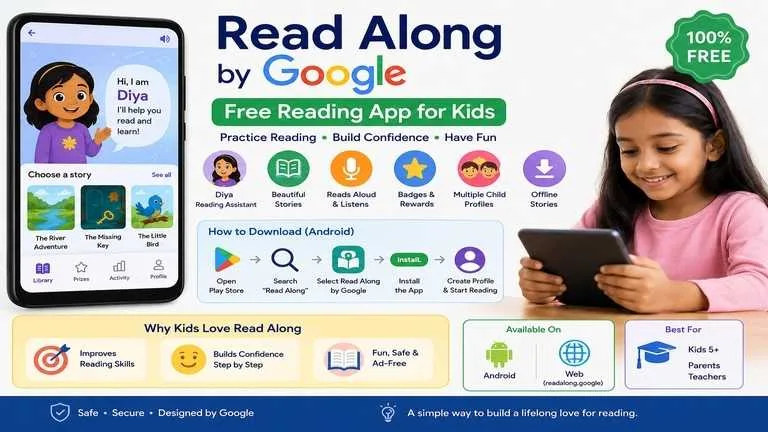
Read Along is not just a story app. It is a reading practice app where children read aloud, and the app listens. The in-app reading assistant, Diya, helps when the child gets stuck, gives encouragement, and makes reading feel less scary.
For many children, especially beginners, reading aloud in front of adults can feel uncomfortable. This is where Read Along works well. It gives children a private space to practice, make mistakes, try again, and slowly build confidence.
What Is Read Along by Google?
Read Along by Google is a free reading tutor app designed for children. It helps kids practice reading by asking them to read stories aloud. When the child reads correctly, the app gives positive feedback. When the child struggles with a word, Diya helps with pronunciation.
The app is especially useful for children who are learning English or improving reading fluency in Indian languages. It supports multiple languages and offers stories, word games, rewards, and progress tracking.
This makes it useful for:
Parents helping kids at home
Teachers supporting early reading practice
Children who need pronunciation support
Kids who feel shy while reading aloud
Students who need daily reading habit building
Read Along App Download: Safe Method
The safest way to download Read Along is from the official Google Play Store. Search for “Read Along” and check that the developer is Google LLC.
Avoid random APK websites unless there is no other option. APK download pages may appear high in search results, but parents should be careful because unofficial APK files can be outdated, modified, or unsafe.
Best method:
Open Google Play Store
Search “Read Along”
Select Read Along by Google
Tap Install
Create child profile
Download stories for offline reading
For Android users, this is the cleanest and safest path.
How to Open Read Along Online
Read Along can also be opened on the web. This is useful for children who read on a laptop, desktop, Chromebook, or classroom computer.
The web version is helpful because the screen is larger, stories are easier to read, and teachers can use it during classroom reading practice.
A parent can open the Read Along website, choose a story, and let the child read aloud with microphone access enabled.
Is Read Along Free?
Yes, Read Along by Google is free. This is one of its biggest advantages compared with many kids reading apps that require subscriptions, paid books, or locked features.
For parents who want a no-cost reading practice tool, Read Along is a strong option.
Main Features of Read Along
The strongest feature is Diya, the reading assistant. Diya listens while the child reads and supports them when needed.
Other useful features include:
Multiple child profiles
Stories arranged by difficulty
Offline story downloads
Stars and badges
Word games
Progress activity page
Support for multiple languages
Simple child-friendly design
The app does not feel like a school test. That matters. Children are more likely to continue reading when the experience feels light and rewarding.
Why Read Along Works for Kids
Reading improves with regular practice, not one-time effort. A child who reads for 10 minutes daily often improves more naturally than a child forced to read for one hour occasionally.
Read Along supports this habit because the sessions are short, interactive, and less stressful.
A good daily routine can be:
5 minutes: child reads an easy story
3 minutes: child repeats difficult words
2 minutes: parent asks what the story was about
This small routine improves reading fluency, pronunciation, vocabulary, and confidence.
Read Along App for Indian Kids
For Indian parents, Read Along is especially useful because it supports Indian languages along with English. Many children in India understand their mother tongue well but struggle when reading English aloud.
Parents can start with a familiar language and slowly move to English stories. This reduces fear and builds comfort.
For example, a child can first read Hindi or Gujarati-supported content if available in their region, then move to simple English stories. The goal should not be speed. The goal should be confidence.
Read Along App vs Other Reading Apps
Read Along is best for reading aloud practice. Other apps may be better for audiobooks, animated stories, phonics, or paid reading programs.
If your child needs pronunciation practice, Read Along is a strong choice.
If your child wants bedtime stories, an audiobook app may be better.
If your child needs structured phonics lessons, a phonics-specific app may help more.
If your child needs school textbook reading, Read Along may not fully replace parent or teacher guidance.
Common Mistakes Parents Make
The biggest mistake is using the app like a game only. Some children may tap for help again and again instead of reading aloud. Parents should gently encourage them to read first, then use help only when stuck.
Another mistake is choosing stories that are too difficult. If a child fails too often, they lose interest. Start easy. Confidence comes before difficulty.
Do not compare siblings. One child may read fast, another may read slowly. Reading confidence grows differently for every child.
Best Way to Use Read Along at Home
Sit near the child, but do not interrupt every mistake. Let the app guide them first.
After the story, ask simple questions:
What happened in the story?
Which word was difficult?
Which character did you like?
Can you read one sentence again?
This turns reading into understanding. Reading is not only pronunciation. Comprehension matters too.
Best Way to Use Read Along in School
Teachers can use Read Along for daily reading corners, remedial learning, or small group practice.
A practical classroom method:
Group children by reading level
Give each group 10 minutes
Let children use headphones if possible
Track progress weekly
Ask children to retell the story orally
This helps teachers support weak readers without making them feel embarrassed.
Is Read Along Safe for Kids?
Read Along is developed by Google, which gives it stronger trust than unknown reading apps. Still, parents should supervise app use, download it only from official sources, and avoid giving children unrestricted device time.
The app should be treated as a learning tool, not a babysitter.
Who Should Use Read Along?
Read Along is suitable for:
Children aged 5 and above
Early readers
Children learning English
Kids who need pronunciation practice
Parents looking for free reading apps
Teachers supporting foundational literacy
It may not be enough for children with serious reading difficulties. In such cases, teacher guidance or specialist support may be needed.
Best Read Along Apps for Kids
Read Along by Google is one of the best free options for reading aloud practice.
Other types of apps parents may consider include:
Audiobook apps for listening habit
Phonics apps for letter sounds
Digital library apps for story variety
Interactive story apps for younger kids
School reading apps for structured curriculum
The best app depends on the child’s need. For daily free reading aloud practice, Read Along by Google is hard to ignore.
Read Along by Google is a practical, free, and parent-friendly reading app for kids. Its biggest strength is not just stories. Its real value is that it listens while the child reads.
For parents, the best approach is simple: use it for 10 minutes daily, choose easy stories first, avoid pressure, and celebrate small progress.
A child who enjoys reading is more likely to keep reading. That is where Read Along can genuinely help.

COMMENTS (5)
Kanti
હું ધોરણ 9 માં અ
હું ધોરણ 9 માં ભણું છું
હૂ ધોરણ 9 માં ભણું છું
srs aa Read Along App Aapna mate khub upyogi thase emay khash english sikhava mate
STD 9
PDF Sanskrit
Leave a Comment