
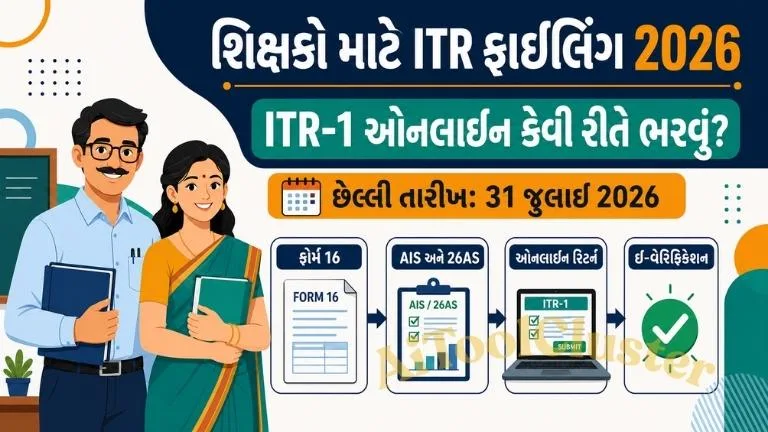
Teacher ITR Filing 2026 Gujarat
પૂરા પગારી શિક્ષક, વિદ્યાસહાયક અને અન્ય salaried employees માટે ITR-1 online filingની સરળ અને જવાબદારીપૂર્વક તૈયાર કરેલી માર્ગદર્શિકા.
સામાન્ય Due Date: 31 July 2026ગુજરાતના પૂરા પગારી શિક્ષકો, વિદ્યાસહાયકો અને અન્ય પાત્ર salaried government employees હવે Income Tax Departmentના e-Filing portal પરથી પોતાનું Income Tax Return online ભરી શકે છે. યોગ્ય eligibility ધરાવતા શિક્ષક માટે સામાન્ય રીતે ITR-1 Sahaj સરળ return form બની શકે છે.
Assessment Year 2026-27 એટલે Financial Year 2025-26 દરમિયાન મેળવેલી આવકનો return. Income Tax Departmentની હાલની સત્તાવાર માહિતી પ્રમાણે સામાન્ય non-audit individual taxpayers માટે ITR filing last date 31 July 2026 દર્શાવવામાં આવી છે. જોકે સરકાર અથવા CBDT દ્વારા due dateમાં ફેરફાર થઈ શકે છે, તેથી filing પહેલાં official portal તપાસવું જરૂરી છે.
Teacher ITR Filing 2026 શું છે?
Income Tax Return એક annual statement છે જેમાં taxpayer પોતાની salary, interest, house property, eligible deductions, tax paid અને refund સંબંધિત વિગતો Income Tax Departmentને રજૂ કરે છે.
શાળામાં ફરજ બજાવતા પૂરા પગારી શિક્ષક, વિદ્યાસહાયક, આચાર્ય, શિક્ષણ સહાયક અથવા અન્ય employeeનો salaryમાંથી TDS કપાયો હોય તો પણ return file કરવાની જરૂર પડી શકે છે. TDS કપાઈ જવો અને ITR file કરવું બંને અલગ બાબતો છે.
જો salary અથવા bank interestમાંથી જરૂર કરતાં વધારે tax કપાયો હોય તો સાચી રીતે ITR file અને e-verify કર્યા પછી eligible taxpayer income tax refund મેળવી શકે છે. પરંતુ refund આપમેળે નક્કી નથી થતો; returnમાં દર્શાવેલી માહિતી અને Income Tax Departmentના processing પર તે આધારિત છે.
શું પૂરા પગારી શિક્ષક અને વિદ્યાસહાયક ITR-1 ભરી શકે?
હા, ઘણા salaried teachers ITR-1 file કરી શકે છે. પરંતુ દરેક શિક્ષક માટે ITR-1 યોગ્ય હશે એવું જરૂરી નથી. હાલની eligibility પ્રમાણે taxpayer resident individual હોવો, permitted income sources ધરાવતો હોવો અને કુલ આવકની નક્કી મર્યાદા સહિતની શરતો પૂર્ણ કરતો હોવો જરૂરી છે.
ITR-1 કોના માટે યોગ્ય હોઈ શકે?
- ભારતમાં resident individual હોય.
- Income from Salary અથવા Pension હોય.
- ITR-1માં મંજૂર house property income હોય.
- Bank interest, fixed deposit interest અથવા family pension જેવી permitted other-source income હોય.
- Agricultural income નક્કી મર્યાદા સુધી હોય.
- Total income સામાન્ય રીતે ₹50 લાખની prescribed limitમાં હોય.
- Current ITR-1 formમાં મંજૂર હોય તેવી અન્ય મર્યાદિત income હોય.
ITR-1 કોના માટે યોગ્ય ન હોઈ શકે?
નીચેની કોઈ સ્થિતિ લાગુ પડતી હોય તો ITR-1 file કરતાં પહેલાં Chartered Accountant અથવા qualified tax professionalની સલાહ લેવી:
- Total income applicable ITR-1 limitથી વધારે હોય.
- Business અથવા professional income હોય.
- ITR-1માં મંજૂર ન હોય તેવા capital gains હોય.
- Foreign asset, foreign bank account અથવા foreign income reporting જરૂરી હોય.
- Taxpayer કોઈ companyમાં director હોય.
- Unlisted equity shares રાખેલા હોય.
- Lottery, betting, gambling અથવા race-horse જેવી restricted income હોય.
- Agricultural income prescribed limitથી વધારે હોય.
- Resident status ITR-1 માટે eligible ન હોય.
- એકથી વધુ જટિલ income sources અથવા special-rate income હોય.
ITR ભરતાં પહેલાં કયા Documents તૈયાર રાખવા?
ITR-1 online filing for teachers શરૂ કરતાં પહેલાં નીચેના documents અને details તૈયાર રાખવાથી returnમાં ભૂલ થવાની શક્યતા ઘટે છે:
- PAN card અને Aadhaar details
- PAN સાથે linked mobile number
- Income Tax e-Filing login credentials
- Employer દ્વારા આપવામાં આવેલ Form 16
- Salary slips અને annual salary statement
- Form 26AS
- Annual Information Statement એટલે AIS
- Taxpayer Information Summary એટલે TIS
- Bank savings અને fixed deposit interest certificates
- Housing loan interest certificate, જો લાગુ પડે
- Eligible tax-saving investment proofs
- NPS contribution details
- Health insurance premium details
- Eligible donation receipts
- Validated bank account details
- અગાઉ file કરેલા ITRની copy, જો ઉપલબ્ધ હોય
Form 16 શું કામ આવે છે?
Form 16 employer દ્વારા employeeને આપવામાં આવતું salary TDS certificate છે. તેમાં employeeને ચૂકવાયેલ salary, exemptions, deductions, taxable income અને employer દ્વારા deduct કરાયેલ TDSની માહિતી હોય છે.
Online returnમાં ઘણી વિગતો pre-filled આવી શકે છે, છતાં તેને Form 16 સાથે સરખાવવી જરૂરી છે. Blindly pre-filled data accept ન કરવો.
AIS અને Form 26AS શા માટે તપાસવા?
AISમાં salary ઉપરાંત bank interest, securities transactions, TDS, TCS અને અન્ય reported financial information દેખાઈ શકે છે. Form 26ASમાં tax credit અને TDSની વિગતો તપાસી શકાય છે.
Form 16, AIS અને Form 26AS વચ્ચે mismatch હોય તો return submit કરતાં પહેલાં તેનું કારણ સમજવું જોઈએ. Employer અથવા bank દ્વારા PAN અથવા amount reportingમાં ભૂલ હોય તો correctionની જરૂર પડી શકે છે.
Old Tax Regime કે New Tax Regime કેવી રીતે પસંદ કરવી?
AY 2026-27માં New Tax Regime default regime છે. ITR-1માં eligible non-business taxpayer portal પર ઉપલબ્ધ option દ્વારા old regime પસંદ કરી શકે છે, પરંતુ બંને regimesમાં slab rates, rebate, exemptions અને deductionsના નિયમો અલગ હોય છે.
New Tax Regime પસંદ કરતાં પહેલાં
- Applicable slab rates તપાસો.
- Standard deduction અને permitted deductions સમજો.
- જૂની regimeમાં મળતી તમામ deductions નવી regimeમાં મળશે એવું ન માનો.
- Form 16માં employerએ કઈ regimeથી TDS ગણ્યો છે તે તપાસો.
Old Tax Regime પસંદ કરતાં પહેલાં
- Section 80C હેઠળના eligible investments તપાસો.
- Section 80D હેઠળ eligible health insurance premium તપાસો.
- Housing loan interest અને HRA rules લાગુ પડે છે કે નહીં તે ચકાસો.
- Old regimeની total tax liability નવી regime સાથે compare કરો.
Teacher અને Vidya Sahayak માટે ITR-1 Online Filing Process
નીચેની process સામાન્ય માર્ગદર્શન છે. Portalના layout અથવા optionsમાં સમયાંતરે ફેરફાર થઈ શકે છે.
- Income Tax e-Filing portal ખોલો
Browserમાં official website incometax.gov.in ખોલો. Search advertisement અથવા બિનસત્તાવાર website દ્વારા login ન કરવું. - Taxpayer accountમાં login કરો
User ID તરીકે PAN દાખલ કરીને password અને security verificationથી login કરો. - File Income Tax Return option પસંદ કરો
Dashboardમાં e-File, Income Tax Returns અને File Income Tax Returnનો વિકલ્પ પસંદ કરો. - Assessment Year પસંદ કરો
FY 2025-26ની income માટે Assessment Year 2026-27 select કરો. - Online filing mode પસંદ કરો
યોગ્ય filing mode પસંદ કરીને individual taxpayer તરીકે આગળ વધો. - યોગ્ય ITR Form પસંદ કરો
Eligibility ચકાસ્યા પછી જ ITR-1 પસંદ કરો. Portal form selection માટે પ્રશ્નો પૂછે તો સાચા જવાબ આપો. - Reason for filing ITR પસંદ કરો
Income limit, refund claim અથવા applicable legal requirement પ્રમાણે સાચું reason પસંદ કરો. - Pre-filled personal information તપાસો
Name, PAN, Aadhaar, address, contact details અને bank account information verify કરો. - Salary income verify કરો
Employer details, gross salary, exemptions અને taxable salary Form 16 સાથે સરખાવો. - Other income ઉમેરો
Savings interest, FD interest, family pension અથવા permitted other-source income છૂટી ન જાય તેનું ધ્યાન રાખો. - Tax Regime પસંદ કરો
New અને Old Tax Regimeની tax liability compare કરીને eligible option પસંદ કરો. - Deductions verify કરો
પસંદ કરેલી tax regimeમાં જે deductions legally available હોય તે જ claim કરો. - Tax paid details તપાસો
Employer TDS, bank TDS, advance tax અથવા self-assessment taxની information Form 26AS સાથે match કરો. - Return preview કરો
Total income, deductions, tax payable અને refund amount ધ્યાનપૂર્વક તપાસો. - Tax payable હોય તો ચુકવણી કરો
Outstanding tax liability હોય તો official payment facilityથી self-assessment tax ભરો અને payment details returnમાં reflect થાય તેની ખાતરી કરો. - ITR submit અને e-Verify કરો
Return submit કર્યા પછી Aadhaar OTP, net banking, bank EVC અથવા ઉપલબ્ધ official methodથી e-verification પૂર્ણ કરો.
ITR Submit કર્યા પછી E-Verification શા માટે જરૂરી?
Return upload કરવું અને return filing process પૂર્ણ થવી એક જ બાબત નથી. ITR submit કર્યા પછી prescribed periodમાં e-verification કરવું જરૂરી છે. Return verify ન થાય તો તે validly filed return તરીકે process ન થવાની શક્યતા રહે છે.
Verification સફળ થયા પછી acknowledgement download કરીને સુરક્ષિત જગ્યાએ સાચવી રાખવું. Return acknowledgementમાં PAN અને financial information હોય છે, તેથી તેને public WhatsApp group અથવા social media પર share ન કરવું.
Income Tax Refund માટે Bank Account Validate કરો
Refund મેળવવા માટે taxpayerના PAN સાથે જોડાયેલ યોગ્ય bank account pre-validate થયેલું હોવું જોઈએ. Account number, IFSC, name અને PAN linkageમાં mismatch હોય તો refund credit થવામાં મુશ્કેલી આવી શકે છે.
Refund amount returnમાં દેખાય છે એટલે તે તરત bankમાં આવશે એવો અર્થ નથી. Return process થયા પછી departmentની verification અને adjustment પ્રમાણે refund issue થાય છે.
Teacher ITR Filing દરમિયાન થતી સામાન્ય ભૂલો
- ખોટું Assessment Year પસંદ કરવું.
- દરેક salaried employee માટે ITR-1 યોગ્ય છે એવું માનવું.
- Form 16ની માહિતી blindly copy કરવી.
- Bank savings અને FD interest ન દર્શાવવું.
- AIS અથવા Form 26AS verify ન કરવું.
- Old અને New Tax Regime compare કર્યા વગર પસંદ કરવી.
- પુરાવા વગર deductions claim કરવી.
- Capital gain અથવા other income છુપાઈ જવા દેવી.
- Refund માટે ખોટું bank account પસંદ કરવું.
- Return submit કર્યા પછી e-verification ભૂલી જવું.
- OTP, password અથવા acknowledgement અન્ય વ્યક્તિ સાથે share કરવું.
ITR Filing 2026 માટે Official Links
| સેવા | ઉપયોગ | Official Link |
|---|---|---|
| Income Tax e-Filing | ITR file, verify અને status check કરવા | Open Portal |
| ITR-1 User Manual | ITR-1 eligibility અને online process જાણવા | View Guide |
| ITR Utilities | Official return filing utilities મેળવવા | View Downloads |
| Aitoolcluster | Teachers માટે latest guides અને useful updates | View Updates |
31 July 2026 પછી ITR File કરવામાં આવે તો શું?
Applicable due date પછી return file કરવામાં આવે તો belated returnના provisions, late filing fee, interest અને loss carry-forward restrictions જેવી અસરો થઈ શકે છે. Late filing fee taxpayerની income અને applicable legal provisions પ્રમાણે નક્કી થઈ શકે છે.
Due date સુધી રાહ ન જોવી. છેલ્લાં દિવસોમાં portal traffic, OTP delay, tax-payment reflection અથવા document mismatchને કારણે મુશ્કેલી થઈ શકે છે. Form 16, AIS અને 26AS ઉપલબ્ધ થયા પછી વહેલી તકે verification શરૂ કરવું યોગ્ય છે.
Teacher ITR Filing 2026 Gujarat પ્રક્રિયા યોગ્ય documents સાથે શરૂ કરવામાં આવે તો પૂરા પગારી શિક્ષક અને વિદ્યાસહાયક પોતાનું return online file કરી શકે છે. ITR-1 select કરતાં પહેલાં eligibility તપાસવી, Form 16ને AIS અને Form 26AS સાથે match કરવું અને Old તથા New Tax Regimeની tax liability compare કરવી ખૂબ જરૂરી છે.
Return submit કર્યા પછી e-verification પૂર્ણ કરો અને acknowledgement સુરક્ષિત રાખો. શિક્ષકો માટેની આવી ઉપયોગી guides, government employee updates અને educational resources માટે Aitoolclusterની મુલાકાત લઈ શકાય છે.

COMMENTS (0)
Be the first to comment!
Leave a Comment