
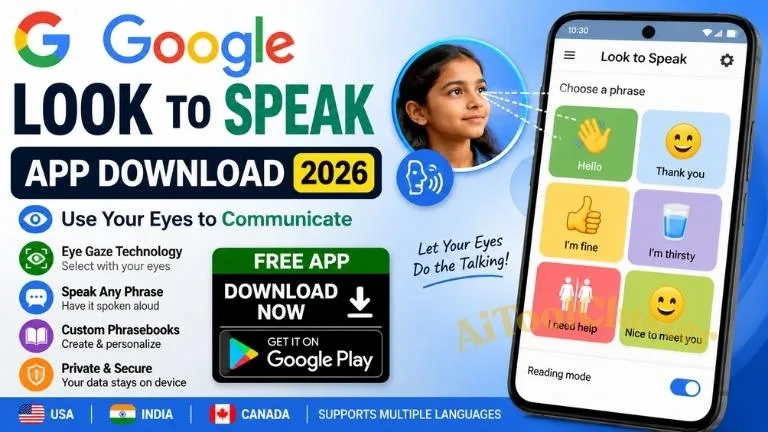
Updated: Google Look to Speak App Free 2026 is an accessibility-focused communication tool from Google designed to help people communicate using eye movements. Instead of typing or speaking, users can look toward choices on the screen to select pre-written phrases, which the phone then speaks aloud.
For families, caregivers, educators and users exploring assistive communication technology, Look to Speak is an interesting example of how a standard smartphone camera and on-device machine learning can support communication.
In this guide, we cover Google Look to Speak app free, Look to Speak app download, Google Look to Speak app Android, Look to Speak for iPhone, Google Look to Speak APK, setup tips, privacy, limitations and the important difference between Look to Speak and Google Assistant.
What Is Google Look to Speak App?
Look to Speak is an Android accessibility application developed by Google Creative Lab. Its purpose is very different from a normal voice assistant.
Instead of saying “Hey Google” or typing a message, the user can use eye movements to navigate through a set of phrases and select the phrase they want the phone to say aloud.
Google explains that the app uses the phone's front-facing camera and machine learning to detect eye-gaze gestures. Google also states that the app's data is private and does not leave the device. ([play.google.com](https://play.google.com/store/apps/details?id=com.androidexperiments.looktospeak&utm_source=chatgpt.com))
This makes the app particularly interesting for people who may have difficulty speaking or using traditional touch-based controls.
Google Look to Speak App Free – Is It Really Free?
Yes. Look to Speak is available as a free Android app through Google Play.
The official Google Play listing currently identifies Google Creative Lab as the developer and shows the app as available for Android phones and tablets. The listing currently shows 100K+ downloads and an update date of May 29, 2024. ([play.google.com](https://play.google.com/store/apps/details?id=com.androidexperiments.looktospeak&utm_source=chatgpt.com))
Important: Free does not mean that every phone will provide identical performance. Camera quality, device position, lighting, screen size and the user's ability to control eye movements can affect the experience.
Google Look to Speak App Download
If you are searching for Google Look to Speak app download, the safest option is the official Google Play listing.
Google's own accessibility resources also list Look to Speak as an Android accessibility tool for selecting phrases and pictures with the eyes and having them spoken aloud. ([support.google.com](https://support.google.com/accessibility/answer/15527540?hl=en&utm_source=chatgpt.com))
Google Look to Speak App Android
The official Look to Speak application is currently an Android app. Google's original announcement described compatibility with Android 9.0 and above, including Android One devices. ([blog.google](https://blog.google/company-news/outreach-and-initiatives/accessibility/look-to-speak/?utm_source=chatgpt.com))
Before installing, it is useful to understand how the app actually works.
- Install Look to Speak from Google Play.
- Open the application and complete the setup.
- Position the phone so the front camera can see your face properly.
- Practice the eye-gaze gestures.
- Select a phrase from the phrasebook.
- The selected phrase is spoken aloud by the device.
The key idea is that the application is not trying to understand every thought you have. It provides a collection of selectable phrases and lets the user navigate those choices with eye movements.
How Does Look to Speak Work?
The process is easier to understand with an example.
Suppose the phrasebook contains several options such as:
- Hello
- Thank you
- I need help
- Please wait
- I am thirsty
- Yes
- No
The user looks toward the appropriate side or direction to narrow the choices and eventually selects the required phrase.
Google says Look to Speak uses the front-facing camera to detect eye-gaze gestures in real time, with machine learning processing taking place on the device. ([play.google.com](https://play.google.com/store/apps/details?id=com.androidexperiments.looktospeak&utm_source=chatgpt.com))
Look to Speak Phrasebook – The Feature Many Users Miss
One of the most useful parts of Look to Speak is the ability to personalize the communication content.
Instead of relying only on generic phrases, users can organize phrases around their own daily needs.
For example, a personalized phrasebook could contain categories for:
- Home
- School
- Family
- Daily needs
- Emergency communication
- Social conversations
This is where the application becomes more practical. The goal isn't to create thousands of phrases. The goal is to make the most frequently needed phrases easy to access.
Google's current Play Store listing also notes a text-free mode that allows choices using emojis, symbols and photos, plus support for multiple phrasebooks. ([play.google.com](https://play.google.com/store/apps/details?id=com.androidexperiments.looktospeak&utm_source=chatgpt.com))
Look to Speak Setup: Why Phone Position Matters
This is one of the biggest real-world issues that basic app descriptions often overlook.
Because the front camera is responsible for detecting eye movements, the phone needs to be positioned consistently.
Google's original guidance recommends positioning the device slightly below eye level and keeping it stable. Google also provides setup and tutorial resources inside the Look to Speak experience. ([blog.google](https://blog.google/company-news/outreach-and-initiatives/accessibility/look-to-speak/?utm_source=chatgpt.com))
Better Setup Approach
- Keep the phone stable rather than holding it continuously.
- Make sure the face is visible to the front camera.
- Avoid strong glare directly on the screen.
- Start with comfortable eye movements.
- Practice before relying on the app for important communication.
Common mistake: Users sometimes stare directly at the phrase they want instead of performing the intended gaze gesture. The app's selection system depends on deliberate eye movements, so completing the setup tutorial is worthwhile.
Is Look to Speak Available for iPhone?
If you are searching for Look to Speak app for iPhone, there is an important distinction.
Google's official Look to Speak pages describe the product as an Android app, and the current official Google Play listing is the supported distribution shown by Google. ([experiments.withgoogle.com](https://experiments.withgoogle.com/looktospeak?utm_source=chatgpt.com))
Therefore, you should not assume that an iPhone version exists simply because you see third-party websites using phrases such as “Look to Speak iOS download.”
Best practice: On iPhone, look for accessibility and assistive-communication features specifically designed for iOS rather than downloading an unofficial file claiming to be the Google Android application.
Google Look to Speak APK – Should You Use One?
Users sometimes search for Google Look to Speak APK when Google Play is unavailable or when they want an older version.
For an accessibility application, the better approach is to use the official Google Play distribution whenever possible.
Third-party APK websites can create compatibility, authenticity and security questions. An APK file may also be an older version that behaves differently from the current release.
Practical rule: If the official Play Store version is available for your Android device, prefer that version instead of searching for an unofficial APK.
Privacy: Does Look to Speak Send Eye Data to Google?
Privacy is particularly important for an application that uses a camera.
The current Google Play listing states that Look to Speak processes the camera feed in real time using machine learning and that all data is private and never leaves the device. The listing's developer-provided Data Safety section currently states that no data is shared with third parties and no data is collected. ([play.google.com](https://play.google.com/store/apps/details?id=com.androidexperiments.looktospeak&utm_source=chatgpt.com))
This is an important distinction from cloud-based services where camera or voice information may be processed remotely.
As always, users should review the current Play Store Data Safety information before installation because privacy disclosures can change with future releases.
Look to Speak vs Google Assistant
This is another area where search results can become confusing.
Look to Speak is not Google Assistant.
Look to Speak is an accessibility communication tool based on eye-gaze selection. Google Assistant, meanwhile, has historically been Google's general-purpose voice assistant for commands, questions and device interactions.
Google is currently transitioning the mobile assistant experience from Google Assistant to Gemini. Google announced that mobile Google Assistant access will begin being removed from September 3, 2026, with the transition expected to take several weeks. Google says the change affects mobile devices and paired accessories, while Google Home and Nest speakers and displays are not covered by that particular mobile transition. ([support.google.com](https://support.google.com/assistant/thread/457649886/important-update-transitioning-from-google-assistant-to-gemini-on-mobile?hl=en-gb&utm_source=chatgpt.com))
So if you search “I want to talk with Google Assistant” in 2026, you may encounter Gemini instead on supported Android phones.
Google Assistant Update Download – What Should You Do?
If your objective is to get the latest Google mobile assistant experience, the relevant product direction is now Gemini, not an old standalone Google Assistant APK.
Google's official Gemini documentation states that Gemini mobile apps are available on Android and iOS, although availability can vary by country, language, account and device. ([support.google.com](https://support.google.com/gemini/answer/14579026?co=GENIE.Platform%3DAndroid&hl=en&utm_source=chatgpt.com))
This creates two separate search intents:
| What You Want | Relevant Tool |
|---|---|
| Eye-gaze communication | Look to Speak |
| AI assistant on mobile | Gemini |
| Traditional Android accessibility controls | Android Accessibility features |
Insights Most People Overlook
1. Look to Speak Is Not a Full Text-to-Speech Keyboard
One of the most important limitations is that the app is based around selecting phrases rather than typing every possible sentence with your eyes.
That means it works best when the user has a collection of frequently needed phrases.
2. Personalization Can Matter More Than the Technology
The eye-tracking technology gets attention, but the phrasebook design may have an even bigger effect on everyday usefulness.
A carefully organized list of 20 frequently needed phrases can be more practical than hundreds of rarely used options.
3. Device Position Is Part of the User Experience
If the phone moves constantly, the camera's view changes and the interaction can become frustrating. A stable setup can make the experience considerably easier.
4. Accessibility Apps Should Be Tested Before They Become Essential
If someone depends on an assistive communication tool, test it in different normal environments before relying on it. Lighting, device position, background conditions and the user's fatigue can influence usability.
5. Look to Speak and Gemini Solve Different Problems
It would be a mistake to treat Gemini as a direct replacement for Look to Speak. Gemini is an AI assistant; Look to Speak is specifically designed around eye-gaze communication.
Who Can Benefit From Look to Speak?
Google describes Look to Speak as a tool intended to help people with speech and motor impairments and also notes that it may be useful for temporary, permanent or situational disabilities. ([experiments.withgoogle.com](https://experiments.withgoogle.com/looktospeak?utm_source=chatgpt.com))
Potential users may include people who have difficulty speaking or using traditional touch interaction but can make deliberate eye movements.
It can also be useful as an assistive technology experiment for caregivers, therapists and educators evaluating communication options.
However, suitability is individual. A professional such as a speech-language therapist or accessibility specialist can help determine whether an eye-gaze communication method fits a particular person's needs.
Important Links
| Resource | Purpose | Link |
|---|---|---|
| Look to Speak | Official Android download | Download |
| Google Look to Speak | Official Google project information | Visit Google |
| Google Accessibility | Android accessibility resources | Learn More |
| Gemini Mobile | Current Google mobile AI assistant | Official Help |
Frequently Asked Questions
Is Google Look to Speak app free?
Yes. The official Look to Speak application is available as a free Android app through Google Play. ([play.google.com](https://play.google.com/store/apps/details?id=com.androidexperiments.looktospeak&utm_source=chatgpt.com))
What is Google Look to Speak used for?
It allows users to select pre-written phrases or pictures using eye movements and have those selections spoken aloud. It is designed as an accessibility communication tool. ([support.google.com](https://support.google.com/accessibility/answer/15527540?hl=en&utm_source=chatgpt.com))
Can I download Look to Speak on Android?
Yes. Google provides the official Look to Speak Android application through Google Play.
Is Look to Speak available for iPhone?
Google's official product pages currently describe Look to Speak as an Android app, and the official distribution is through Google Play. Users looking for an iPhone solution should explore iOS accessibility and assistive-communication options rather than unofficial Look to Speak downloads.
Does Look to Speak require a special eye-tracking device?
No dedicated eye-tracking hardware is required by the app's basic design. It uses the phone's front-facing camera to detect eye-gaze gestures. ([play.google.com](https://play.google.com/store/apps/details?id=com.androidexperiments.looktospeak&utm_source=chatgpt.com))
Does Look to Speak work without internet?
The app's eye-gaze processing is designed to happen on the device, and Google states that the data is private and does not leave the device. However, users should still verify the current app requirements and privacy information on Google Play before relying on it in an offline environment. ([play.google.com](https://play.google.com/store/apps/details?id=com.androidexperiments.looktospeak&utm_source=chatgpt.com))
Can I add my own phrases?
Yes. Personalizing the phrasebook is an important part of making the app useful for everyday communication. The current listing also mentions multiple phrasebooks and a text-free mode using emojis, symbols and photos. ([play.google.com](https://play.google.com/store/apps/details?id=com.androidexperiments.looktospeak&utm_source=chatgpt.com))
Is Look to Speak the same as Google Assistant?
No. Look to Speak is an eye-gaze accessibility communication app. Google Assistant was a general voice assistant, and Google is transitioning its mobile assistant experience to Gemini during 2026. ([support.google.com](https://support.google.com/assistant/thread/457649886/important-update-transitioning-from-google-assistant-to-gemini-on-mobile?hl=en-gb&utm_source=chatgpt.com))
What should I use if I want to talk to Google's AI assistant?
For supported mobile devices, Google's current direction is Gemini. Google provides Gemini mobile apps for Android and iOS, subject to device, account, language and country availability. ([support.google.com](https://support.google.com/gemini/answer/14579026?co=GENIE.Platform%3DAndroid&hl=en&utm_source=chatgpt.com))
Final Verdict
Google Look to Speak App is much more than another voice or AI application. It is an accessibility-focused tool that demonstrates how a smartphone's camera and on-device machine learning can provide an alternative communication method.
For someone who can make deliberate eye movements but has difficulty speaking or using touch controls, the ability to select personalized phrases and have the phone speak them aloud can be meaningful.
The most important practical lessons are simple: use the official Android version, position the phone carefully, personalize the phrasebook, practice the gaze controls and test the setup before depending on it for important communication.
And remember the 2026 Google ecosystem change: Look to Speak and Gemini are not interchangeable products. Look to Speak is focused on eye-gaze communication, while Gemini is Google's newer mobile AI assistant experience.
Bottom line: If you are specifically searching for google look to speak app free, the official Google Play version is the appropriate starting point for Android users. For iPhone users, look for native iOS accessibility and assistive-communication solutions rather than unofficial APK or iOS download claims.


COMMENTS (0)
Be the first to comment!
Leave a Comment